
Plan milestones (year codes)
An income or expense often starts or stops at an event - when you retire, when you claim Social Security, at the end of life. Instead of typing a year, choose a milestone. Milestones move automatically when you change an age, and in every optimizer scenario.
The milestones
| Code | Meaning | Year |
|---|---|---|
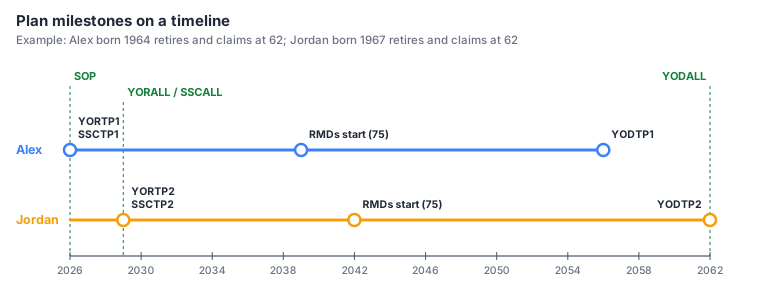
SOP | Start of plan | The current year (plan year 1) |
YORTP1 | Year of retirement, tax payer 1 | Year of birth + retirement age |
YORTP2 | Year of retirement, tax payer 2 | Year of birth + retirement age |
YORALL | Both retired | The later of the two retirements |
SSCTP1 | Social Security claim, tax payer 1 | Year of birth + claim age |
SSCTP2 | Social Security claim, tax payer 2 | Year of birth + claim age |
SSCALL | Both claiming | The later of the two claims |
YODTP1 | Life expectancy year, tax payer 1 | Year of birth + life expectancy |
YODTP2 | Life expectancy year, tax payer 2 | Year of birth + life expectancy |
YODALL | Last life expectancy year (end of plan) | The later of the two |
"ALL" always means the later of the two tax payers. With one tax payer, the TP2 and ALL codes
mean the same as the TP1 codes, and the picker only offers SOP, YORTP1,
SSCTP1 and YODTP1.
The start and end year picker
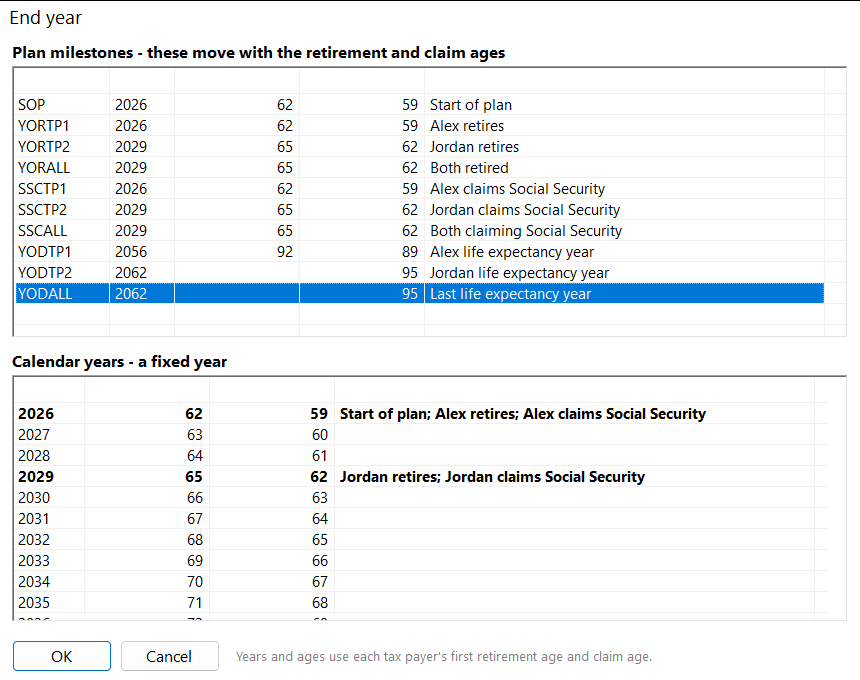
- Plan milestones (top) - each code with the year it falls in today, each tax payer's age that year and what it means.
- Calendar years (bottom) - every year of the plan with both ages and what happens that year: retirements, Social Security claims, the start of RMDs and life expectancy years (in bold).
- Select one entry and click OK (or double-click it). Choosing in one list clears the other.
The grid shows a milestone with its current year, for example YORTP1 (2026); a calendar year shows
just the year.
Milestones move, calendar years don't
The years shown use each tax payer's first retirement age and claim age - the ones Run Plan uses. When the
optimizer tries retirement age 65 instead of 62, every YORTP1 in your income and expenses moves three
years later for that scenario. A calendar year such as 2030 stays put.
Details
- Start and end years are both included: an expense from
YORTP1toYORTP1happens in the retirement year only. - New income and expenses start at
SOPand end atYODALL. - Wages always stop at retirement and pensions always start at it, whatever the end and start years say.
- If tax payer 2 is deleted, dates using their milestones switch to the matching tax payer 1 milestone.